Friday, May 16, 2014

Tools

Tools in software is designed to help developers create better software.  Some common software engineering tools is the git repository, Confluence wiki, and the Jira bug tracking software.  These tools are used to help developers collaborate on the projects. 


Git hub is a popular service for software development.  It uses the Git revision control system so that project members can check in and out code that they are working on [1].  GitHub has other features such as issue tracking and code review.  This tool helps developer keep track of their code changes in a single place so that other developers can view those changes.  It also lets multiple developers work on the same project and makes it relatively easy to merge the multiple changes that were made by multiple coders.

Another is the Confluence wiki.  A wiki is a great place to document the software such as: 
  • how to set up the development environment
  • what is the current architecture of the software.
  • what important changes were made to the software
  • etc...
The confluence wiki integrates with the Jira tracker.  The Jira tracker tracks bugs, issues, assignments etc... [3][4]  All of these tools are used to help developers track their projects so that they can develop better software.


[1]http://en.wikipedia.org/wiki/GitHub
[2]https://github.com/features
[3]https://www.atlassian.com/software/confluence?_mid=04703585bdc248e20d2cfcea35b01f8d&gclid=CKeElr6lsr4CFU5afgod2QgAGQ
[4]https://www.atlassian.com/software/jira

Android


Android is a Linux kernel based operating system that is used on smart phones and tablets  The user interface has the basic touch screen action such as pinching, swiping, tapping, reverse pinching.  Initially the operating system was developed by Android, inc., which was backed by Google who eventually bought the company in 2005 [1].
Android robot.svg

Like all modern operating system, the Android operating system has a layered architecture where the Application is the top layer of the stack and the Linux kernel is the lowest layer.  All Android devices ship with a set of core application, email client, SMS program, calendar, maps, browser, contacts, and other features.  All of the application is written in Java.  The architecture is designed to simplify and re-use the application components.  For example, say that you created a small note taking application and you have an address written down in the note application, you can have your application directly access the map application instead of having the user switch to the map application.  The Android operating system has C/C++ libraries that can be accessed through the application framework. [2] 

How Android works: The big picture

Figure 1.  Android component stack

As you can see from the Android component stack in Figure 1.  The lowest layer is the Linux kernel.  The Library Layer contain the different C/C++ libraries while the very top layer is the Application layer.

As of 2011 Android has the largest install base for mobile devices.  There were more android devices sold in 2013 than Windows, iOS and Mac OS devices combined.  Also as of July 2013 there were 1 million android apps published and 50 billion apps downloaded.  Currently Google is working on putting the android operating system on other devices such smart watches and Google glasses. [2]

[1]http://en.wikipedia.org/wiki/Android_%28operating_system%29
 
[2]Developers, Android. "What is android." http://developer. android. com/guide/basics/what-is-android.html 2 (2011).

Beta Testing

One of the most important process in developing a software product is beta testing.  During this process, the product is released to a few customer for use in the real world.  This evaluation gives developer information on whether or not the software is ready for production release.  It also allows a company to effectively “listen” to the customer.  No other process in development can effectively gauge what the customer is thinking [0].      

Beta testing also helps to find out what the customer want and need and also helps determine or confirm the target market.  By providing these customer needs, it shows that you care and value the customers opinion.  By building this relationship with the customer also builds a good reputation in the product and the company.

In order to build a good reputation, the customer must have a positive perception of the product.  Perception is important because whether the problem is true or false the perception makes it true.  For example, During the 1990's, cheetah modem cooperation was releasing their fastest modem yet which was 20% faster than the competitors.  However during beta testing process, the customer felt that the modem was slower than the competitors because it took longer for it to connect.  Although the modem was faster once it connected the customer perception was negative because the slow connection.  They perceived it to be slower because it started off slow.  The company fixed the problem by improving the connection speed.

Figure 1 an old pci cheetah modem. [1]

Beta testing is an important step in the software development model.  It helps the company find out what the customer actually thinks of the product before it is released for sale.

[0]Beta Testing for Better Software by Michael R. Fine
[1]http://www.epartsandmore.com/images_products/hp-56k-cheetah-internal-pci-92463lar.jpg
 

Thursday, April 17, 2014

Usability Testing


Wikipedia defines Usability testing as "a technique used in user design to evaluate the product by testing it on users" [0].   Things that benefit from usability testing are foods, consumer products, web sites or web application, computer interfaces and devices, mobile apps, etc....  It measures the usability or ease of use of a product.  Just gathering opinion on the usability of the product is not usability testing.  Instead, it is a systematic approach of gathering information while observing the how the user uses the product[0].  For instance, watching how the person interacts with the instruction on building a bike is an example of usability testing [0].


Usability testing has evolved into a more informal way of evaluations [1].  Instead of viewing the participant from a one way mirror or a video recording, some specialist are in the same room as the participant. Specialists are more concerned about the qualitative data then the quantitative data.  Some do very little video taping or large amounts of information gathering. Instead, these specialists write memos highlighting the findings and provide brief recommendations for improvements [1].  By making usability testing more informal it has shortened the release cycle and reduced the cost of the test. Through experience and study, specialist and the participant who act on the state of the product are more confident knowing what’s important.


lookback-color-on-black-v1.0 (200 x 114) An example of a company that has evolved usability testing is a company called LOOKBACK, https://lookback.io.  This company has used technology in mobile apps to give the developer the ability to view the person expression using the onboard camera. The developer is also able to view the current active screen of the product.  The developer does the following to enable this LookBack product.
First, install the lookback plugin onto the mobile app, next the user is requested to record themselves while they test the product.  Finally the user is also able to report bugs and send feedback to the developers[3].  This gives the app creator feed back on the usability of the product while testing it in the real world. Below is a demo of the look back interface, as you can see the developer has the view of the active screen and the users expression.


Lookback player

As technology progresses, usability testing will evolve while remaining a critical part in product development.

[0] http://en.wikipedia.org/wiki/Usability_testing
[1]A Practical Guide to Usability Testing, By Joseph S. Dumas, Janice Redish
[3]https://lookback.io/

Blogs

It's safe to say that we all like to sit at  our computer and waste time by playing games, watching videos, and just surfing the net.  I myself like to structure my "time wasting" by visiting a set websites and blogs that I enjoy reading. A favorite blog that I read often is http://krebsonsecurity.com/.  The author of this blog talks about the latest computer security vulnerabilities and other related computer security topics.  He describes everything from his personal experiences on security to the latest news and report that is currently happening in the security world.  He writes in such a way that both the technical and non-technical can learn something from the articles [0].  Blogs such as this is not only entertaining but instructional.
Brian Krebs

There is a large range of diversity among blogs.  The content can range from journals of daily activities to serious commentaries on important issues [1].  Some blog journal can get really personal, the author would write about their emotional feelings of their daily life.  Blogs provide an easy way for an average person to publish material on any topic that he or she wishes to discuss on the web [2].  Blogs have become a way to distribute information.

[0]http://krebsonsecurity.com/
[1]Why We Blog, by Bonnie A. Nardi, Diane J. Schiano, Michell GumBrecht, and Luke Swartz
[2]Acceptance of blog usage: The roles of technology acceptance, social influence and knowledge sharing motivation, by Chin-Lung Hsua, Judy Chuan-Chuan Li

Monday, March 17, 2014

QR code uses.


QR codes were invented in 1994 as a way to track vehicle parts during manufacturing.  They were designed for fast decoding speeds, hence the name Quick Response code [1].  Since then QR codes have been improved upon to carry more information.  Some common uses of the QR codes are, sending a user to a web site, sending emails, initiating phone calls, producing links to urls, etc [2].  Developers continuing to create new ways to use QR codes.

QR Codes Prove Hot Commodities at SXSW QR Codes Prove Hot Commodities at SXSW
Mahala has designed a QR code called the S-QR code (Secure Quick Response Code) which enables consumers to purchase items just by scanning the code with Mahalas Mobile Wallet application.  This enables merchants to put S-QR codes in social media channels such as Facebook, Twitter, placed in printed media, like magazines or posters.  Shopping carts do not need to be programmed into these channels.

The Wu Music Group has used Mahala S-QR codes to sell there latest Wu Tang clan album "A better tomorrow" through promotional posters [3].


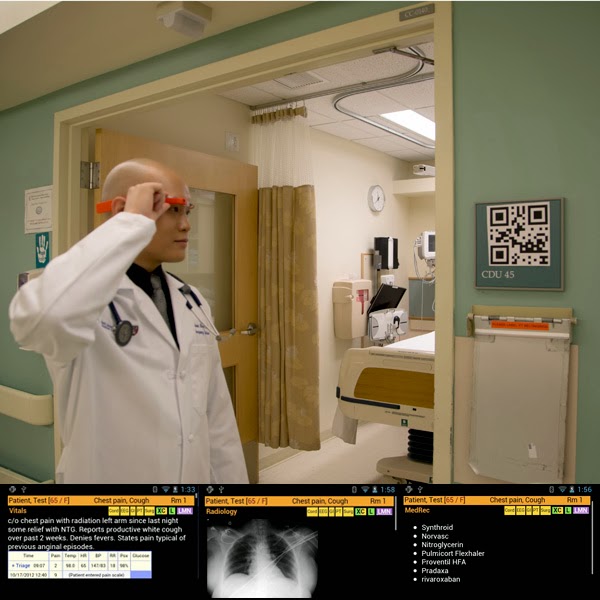
 Beth Israel Deaconess Medical Center in Boston has developed a useful way to use QR codes with Google glass.  The Google glasses are "high tech pair of glasses that includes a video camera, a video screen, speaker, microphone, touch pad and motion sensors."   The doctor wearing the glasses would scan the QR code and be able to view vital signs, lab results and problem while talking to the patient.  This system enables the doctor to view the latest information in real time [4].

These are just some of the innovation that programmers and developers have used with QR codes.  As technology progresses, it will be interesting to see what other ways QR codes can be used.

QR code
[1]http://en.wikipedia.org/wiki/QR_code

What are QR codes used for?  By Michelle White.
[2]http://www.mobile-qr-codes.org/what-are-qr-codes-used-for.html

[3]http://www.mobilemarketingwatch.com/qr-codes-prove-hot-commodities-at-sxsw-40191/

They can be used to look up records instantly with google glasses.
[4]http://arstechnica.com/information-technology/2014/03/er-doctors-use-google-glass-and-qr-codes-to-identify-patients/

Tuesday, March 11, 2014

3 common ways to get malware and how to prevent them.


A malware is a computer program designed to steal sensitive information and to gain unauthorized access to the system [1].  An attack vector is the vulnerability used to compromise the system [2].  For instance, a common attack vector is to send an email, pretending to be a legitimate user, however the email contains a malicious program, a malware.  Another example of an attack vector would be attacking a vulnerability/but in a software like adobe reader.  This blog entry will describes three common attack vector used to install malware onto your system.

The first common attack vector, is by web browser vulnerability.  Users have demanded more from their web browser, everything from playing movies to even running small flash programs which has made the web browser a complex bloated software.  Every new technology that comes out for the browser is a potential for a new vulnerability.  For example, when adobe flash first came out, there was a vulnerability that allowed the web server (that’s the website you go to) to execute any unauthorized code onto your computer [3].  The best thing to do is to update the browser, whenever a new patch is pushed out by the vendor [4].
   
Another common attack which is related to the browser software attack, is software that connect to the network.  For example, the operating system is another software that connects to the network such as windows that may have vulnerabilities. Regular software updates to all your software on your system is important.  Doing windows, java, adobe, etc… update fixes potential bugs and vulnerabilities on your system [5].

The last thing I would like to mention is email attachments.  Victims commonly get malware by being tricked into opening and executing email attachments.  For example, a recent malware named cryptolocker was distributed by masking itself as a pdf from the payroll department.  The file in question had the following extension, “payroll.pdf.exe”.  The windows operating system will hide the .exe extension making the file look like “payroll.pdf” [6].  To prevent such attacks, users should use virus scanners to scan every email attachment that they receive.  They should also look out for anything out of the ordinary, for instance, if it’s not common for payroll to send a pdf attachment, you should double check with that department to find out if it was sent from payroll.

figure 1.  A dialog box from an cryptolocker infected computer [7]. 


This is by no means an exhaustive list.  There are many other attack vectors that can be used.  Using common sense and keeping your software updated is the best defense against malware.


[1] Malware.  Retrieved from:
http://en.wikipedia.org/wiki/Malware

[2] attack vector.  Retrieved from
http://searchsecurity.techtarget.com/definition/attack-vector

[3] Adobe flash.  Retrieved from:
http://en.wikipedia.org/wiki/Adobe_Flash

[4] Outdated browsers:  
http://www.upsdell.com/BrowserNews/why.htm  

[5] Windows Updates & Patch Tuesday FAQ.  By Tim Fisher.  Retrieved from:
http://pcsupport.about.com/od/system-security/a/windows-update-faq.htm  

[6] CryptoLocker Ransomeware Information Guide and FAQ.  By Lawrence Abrams:
http://www.bleepingcomputer.com/virus-removal/cryptolocker-ransomware-information  

[7] Cryptolocker.png Retrieved from.
http://en.wikipedia.org/wiki/File:Cryptolocker.png