Monday, March 17, 2014

QR code uses.


QR codes were invented in 1994 as a way to track vehicle parts during manufacturing.  They were designed for fast decoding speeds, hence the name Quick Response code [1].  Since then QR codes have been improved upon to carry more information.  Some common uses of the QR codes are, sending a user to a web site, sending emails, initiating phone calls, producing links to urls, etc [2].  Developers continuing to create new ways to use QR codes.

QR Codes Prove Hot Commodities at SXSW QR Codes Prove Hot Commodities at SXSW
Mahala has designed a QR code called the S-QR code (Secure Quick Response Code) which enables consumers to purchase items just by scanning the code with Mahalas Mobile Wallet application.  This enables merchants to put S-QR codes in social media channels such as Facebook, Twitter, placed in printed media, like magazines or posters.  Shopping carts do not need to be programmed into these channels.

The Wu Music Group has used Mahala S-QR codes to sell there latest Wu Tang clan album "A better tomorrow" through promotional posters [3].
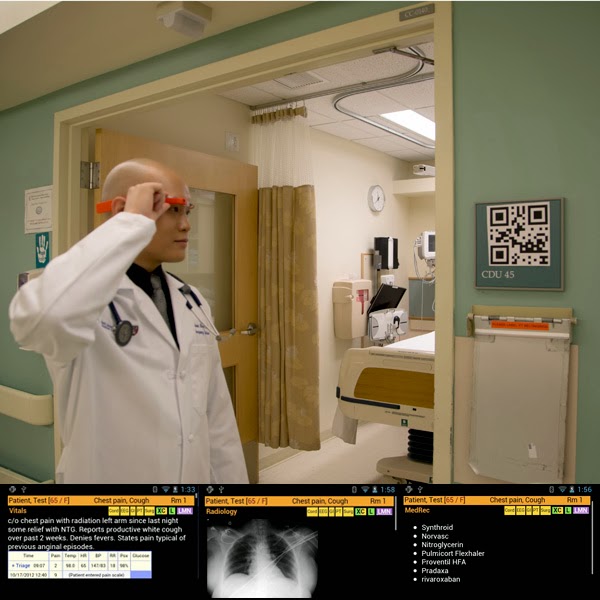


 Beth Israel Deaconess Medical Center in Boston has developed a useful way to use QR codes with Google glass.  The Google glasses are "high tech pair of glasses that includes a video camera, a video screen, speaker, microphone, touch pad and motion sensors."   The doctor wearing the glasses would scan the QR code and be able to view vital signs, lab results and problem while talking to the patient.  This system enables the doctor to view the latest information in real time [4].

These are just some of the innovation that programmers and developers have used with QR codes.  As technology progresses, it will be interesting to see what other ways QR codes can be used.

QR code
[1]http://en.wikipedia.org/wiki/QR_code

What are QR codes used for?  By Michelle White.
[2]http://www.mobile-qr-codes.org/what-are-qr-codes-used-for.html

[3]http://www.mobilemarketingwatch.com/qr-codes-prove-hot-commodities-at-sxsw-40191/

They can be used to look up records instantly with google glasses.
[4]http://arstechnica.com/information-technology/2014/03/er-doctors-use-google-glass-and-qr-codes-to-identify-patients/

Tuesday, March 11, 2014

3 common ways to get malware and how to prevent them.


A malware is a computer program designed to steal sensitive information and to gain unauthorized access to the system [1].  An attack vector is the vulnerability used to compromise the system [2].  For instance, a common attack vector is to send an email, pretending to be a legitimate user, however the email contains a malicious program, a malware.  Another example of an attack vector would be attacking a vulnerability/but in a software like adobe reader.  This blog entry will describes three common attack vector used to install malware onto your system.

The first common attack vector, is by web browser vulnerability.  Users have demanded more from their web browser, everything from playing movies to even running small flash programs which has made the web browser a complex bloated software.  Every new technology that comes out for the browser is a potential for a new vulnerability.  For example, when adobe flash first came out, there was a vulnerability that allowed the web server (that’s the website you go to) to execute any unauthorized code onto your computer [3].  The best thing to do is to update the browser, whenever a new patch is pushed out by the vendor [4].
   
Another common attack which is related to the browser software attack, is software that connect to the network.  For example, the operating system is another software that connects to the network such as windows that may have vulnerabilities. Regular software updates to all your software on your system is important.  Doing windows, java, adobe, etc… update fixes potential bugs and vulnerabilities on your system [5].

The last thing I would like to mention is email attachments.  Victims commonly get malware by being tricked into opening and executing email attachments.  For example, a recent malware named cryptolocker was distributed by masking itself as a pdf from the payroll department.  The file in question had the following extension, “payroll.pdf.exe”.  The windows operating system will hide the .exe extension making the file look like “payroll.pdf” [6].  To prevent such attacks, users should use virus scanners to scan every email attachment that they receive.  They should also look out for anything out of the ordinary, for instance, if it’s not common for payroll to send a pdf attachment, you should double check with that department to find out if it was sent from payroll.

figure 1.  A dialog box from an cryptolocker infected computer [7]. 


This is by no means an exhaustive list.  There are many other attack vectors that can be used.  Using common sense and keeping your software updated is the best defense against malware.


[1] Malware.  Retrieved from:
http://en.wikipedia.org/wiki/Malware

[2] attack vector.  Retrieved from
http://searchsecurity.techtarget.com/definition/attack-vector

[3] Adobe flash.  Retrieved from:
http://en.wikipedia.org/wiki/Adobe_Flash

[4] Outdated browsers:  
http://www.upsdell.com/BrowserNews/why.htm  

[5] Windows Updates & Patch Tuesday FAQ.  By Tim Fisher.  Retrieved from:
http://pcsupport.about.com/od/system-security/a/windows-update-faq.htm  

[6] CryptoLocker Ransomeware Information Guide and FAQ.  By Lawrence Abrams:
http://www.bleepingcomputer.com/virus-removal/cryptolocker-ransomware-information  

[7] Cryptolocker.png Retrieved from.
http://en.wikipedia.org/wiki/File:Cryptolocker.png

Monday, March 3, 2014

open source, how it is used


figure 1.  Open source initiative logo [1] 

Open source software is a free software that can be modified and distributed by anyone [2].  Consumer utilizes open-source software as a free alternative to proprietary software.  While businesses use open-source to save and/or make money.  Academia has used open source to study and learn different software technology.  The use and study of open source has had a beneficial impact on economics and innovation in software technology.

When people think of open-source, they think of free software that they can use without worrying about the cost [3].  For instance, you can download and install Openoffice for free as opposed to Microsoft office that can cost hundreds of dollars.  Openoffice, an open source project, provides the same type of tools to write a paper or to create a presentation.  For every popular proprietary software that is sold to consumers, there is a good chance that a free open source alternative exists.

figure 2.  Open Office logo [4] 

Not only has businesses adopted open-source software many has taken the open source software and modified it to provide services to people as part of their business model.  Companies such as Google, Yahoo and facebook have utilized open-source software such as the Mysql database and the Apache web server, to provider a service to the consumer [5].  Some companies such as Yahoo has contributed to the open-source by creating the Hadoop software [6].  Open-source software has had a significant impact on how business is done.
 
figure 3.  Hadoop logo[7] 

Academia has used open-source software to study different subjects in computer science and engineering.  The openness and the availability of the source code enables academics to study and make modification to the existing software [8].  Through these studies and modification, academia has lead in innovation and improvements in software.  Consumers and businesses have greatly benefited from these improvements.

[1] Open source initiative logo. Retrieved from
http://dsp.rice.edu/lml/open

[2] The Open Source Initiative. Retrieved from
http://opensource.org/

[3] Open Source.  Retrieved from
http://en.wikipedia.org/wiki/Open_source

[4] Apache OpenOffice.  Retrieved from
https://www.openoffice.org/

[5] Newsmaker: A look inside Google’s open-source kitchen. by Joris Evers. Retrieved from  
http://news.cnet.com/A-look-inside-Googles-open-source-kitchen/2008-7344_3-6143465.html

[6] Apache Hadoop.  Retrieved from
http://en.wikipedia.org/wiki/Apache_Hadoop

[7] Hadoop logo.svg.  Retrieved from
http://en.wikipedia.org/wiki/File:Hadoop_logo.svg

[8] OpenBSD.  Retrieved from
http://en.wikipedia.org/wiki/OpenBSD